 smallbox
Reading the system honestly
Why is my system always surprising me?
Where business rules hide in old codebases
A business rule is the answer to a why question. Why does this customer get a 12% discount? Why does the partner CSV add a column on Fridays? Why does this account skip the credit check? Every system contains hundreds of these answers. The trouble in an inherited system is that nobody on the team can produce them anymore — not because the rules are gone, but because they are spread across at least seven kinds of places, and most teams only look in one or two.
When a system surprises you, this is almost always why. The behaviour was deliberate ten years ago. The rule that explains it is hiding somewhere nobody thought to look.
The wrong place to look first
The default move is to read the code. Open OrderService, scroll until something looks unusual, try to deduce what business question that line is answering. This works for the rules that happen to be in OrderService. It misses everything else, and everything else is most of them.
The deeper mistake is to assume the rules are written in one place at all. They almost never are. A real system distributes them across the locations that were convenient on the day each rule was added. Convenience changed over the years, so the distribution is uneven. Some areas have rules in code; some areas have the same rules duplicated in a stored procedure and an admin tool; some areas have no rule visible in code because the rule lives in a configuration file the deploy reads at startup.
The System Report does not assume one location. It builds a Rules Ledger during the architecture-by-reading pass and lists, per rule, where it is implemented and how easy each version is to change without a deploy.
The seven places to look
Each of these is a real source of business rules, and each one shows up in nearly every long-running codebase.
Code. The visible source. Easy to find when you know what to search for, almost impossible to find by reading. Magic numbers and magic strings cluster around hidden rules — if (customerId == 4711) or discount * 0.88 — each one usually a one-time concession to a specific client that nobody has revisited.
Database constraints and triggers. Foreign keys, check constraints, NOT NULLs, unique indexes, defaults — all of these can encode business rules without the application code knowing. Database triggers are worse: they fire silently on writes, change the meaning of an insert, and almost never appear in the IDE search of the engineer trying to debug.
Stored procedures and views. The application calls a procedure; the procedure does the actual work. The codebase shows _db.Exec("sp_PostInvoice") and the rule lives in 400 lines of T-SQL nobody has read this decade.
Configuration files. appsettings.json, web.config, environment variables, feature flags. Some of these are operational; some are business rules in disguise. Customers in this country pay this VAT rate in a config file is a business rule. It changes when the law changes, and the deploy that ships it is a business event.
Admin tools and back-office screens. The most dangerous hiding place. An admin clicks a button that "fixes" a stuck account; the click runs a method that bypasses three validations. The bypass is a business rule — this kind of account is allowed to skip the credit check, but only when an admin pushes the button — and it is implemented in the click handler of an internal form nobody outside the admin team has ever opened.
Time-based logic. If Friday after 5pm, hold the email until Monday. If end-of-quarter, run the longer reconciliation path. If the customer signed up before 2018, charge the legacy fee. These rules are real, they were urgent the day they were added, and they are almost never documented. They show up in code as DateTime.Now.DayOfWeek checks scattered across services.
People. The hardest source. Marie always knows when a partner CSV is wrong before the partner does. Pawel manually re-runs the settlement job if it failed overnight. The finance team adjusts the rounding on three customer invoices every month. These rules are not in the system; they are wrapped around it. They become visible only in interviews, and they disappear when the person leaves.
The Rules Ledger
What the report does with this is mechanical. During the architecture-by-reading pass, it picks five representative request, job, or admin flows and traces them end to end — controller, service, repository, database, vendor calls, side effects, response shape. Every rule encountered along the way goes into a ledger:
| Rule | Location(s) | Trigger | Confirmable by | Easy to change? |
|---|---|---|---|---|
| 12% loyalty discount on second purchase | PricingService + discount_rules table | Purchase event | Marie (CS lead) | Yes — config-only |
| VAT 7% for customers in country X | appsettings.Production.json | Invoice generation | Finance (Pawel) | Yes — config + redeploy |
| Skip credit check on account type "P" | Admin override screen | Manual click | Operations team | No — admin-only path |
| Hold email until Monday after Friday 5pm | EmailDispatcher.Schedule | Outbound email | Nobody currently | No — buried in code |
| Settlement reconciliation runs at 02:00 UTC | Cron config | Time | Pawel (operations) | Yes — cron edit |
Three things become visible from the ledger that were not visible from the code.
Rules duplicated across locations. The pricing rule is in PricingService and in a database table. Both can be edited. Which one wins depends on which path the system takes that day. Until somebody reconciles them, every change to the rule is a guess.
Rules with no confirmer. The Friday-5pm hold has no living owner. Nobody on the team can say whether the rule is still correct. That is a finding in its own right, and the recommendation is to confirm or remove the rule before the area around it is changed.
Rules whose home is wrong. The credit-check skip lives in an admin screen because that was convenient when it was first added, but the rule has been used routinely for three years. Moving it to a typed, observable code path is usually a small and high-value piece of work — the kind of finding the report ranks above ten cosmetic refactors.
What this looks like at scale
When the rule lives in a typed, observable place, the system stops surprising the team. The pattern is in production on CompanyGraph: the rule that observations describe structure and interpretations emerge from alignment is encoded in interfaces, evaluators, and prompt configs, not in scattered if-statements. When something goes wrong with the rule, there is one place to look. The cost of moving a rule from invisible to typed is paid once. The benefit compounds.
The opposite pattern is also visible. The TwelveData integration boundary was built deliberately so that the credit-accounting rule — every vendor call costs N credits, the daily budget is X — lives at the boundary, not scattered across every executor. The rule is in one place because the design forced it there. A naive integration would have spread the same rule across thirty-five executors, making it invisible until the credit budget overran.
A third shape: take a rule out of the dangerous admin-tools category by giving the admin tool a typed source of truth. The transactional emails the two products send — magic links, email-change confirmations, verification and viewer links — live as JSON templates in email-service/templates/{System}/*.json, version-controlled, reviewable, deployable. The admin page reads and writes the same templates, scoped per system and per language:
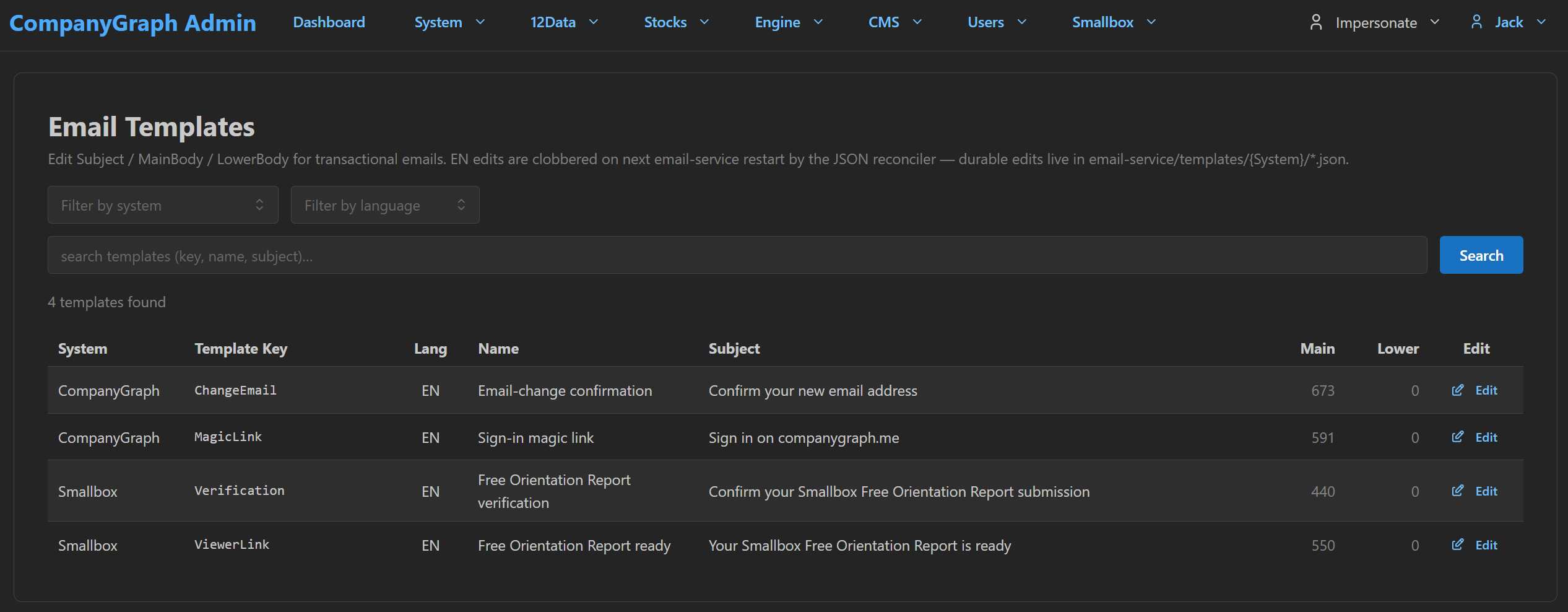
The crucial detail is in the page's own disclaimer: EN edits are clobbered on next email-service restart by the JSON reconciler. The admin form is an editing surface; the rule's home is still the JSON file. That inverts the dangerous shape from the Admin tools section above — the rule lives in the click handler — into a safe one: the admin tool views and writes the rule, but the rule itself lives somewhere git log can reach. The easy to change column in the ledger flips from "no, buried in code" to "yes, by a named operator, with a versioned diff".
A fourth shape closes the loop, and the seven hiding places do not cover it. Every location above answers where does this rule live? The harder case is the one where the honest answer is nowhere. On a gamified financial-literacy platform, classroom assignments carry a due date: the teacher sets it when assigning, the server stores it on the row, the student's screen displays it, and the status enum has an Expired value sitting there ready for it. Every signal a reader can see says deadlines are enforced. Nothing enforces them — no code path ever sets that status, and the date is acted on by nothing.
Call that a phantom rule: not hidden in one of the seven places, but believed into existence by the surface area around it. It is worse than a buried rule, because a buried rule at least behaves consistently once you find it. A phantom rule fails only when somebody finally depends on it — a teacher assuming late work stops being accepted, a report assuming Expired counts for something.
The fix is the ledger discipline carried one step further. That platform's admin draws the assignment lifecycle as a page, and prints the absence directly underneath it: an Expired value exists in the enum but nothing ever sets it — due dates don't enforce. The Location column reads nowhere, in writing, where the team actually looks. Whether deadlines should enforce then becomes a product decision someone can take, instead of an assumption nobody knew they were making.
What this tells you
Three moves, in order.
Stop assuming the codebase tells you everything. On any system more than three years old, the codebase is one of seven hiding places. If you have not looked in the database constraints, the stored procedures, the config, the admin tools, the time-based checks, and the heads of two operators, you do not yet know what the system does.
Build the ledger before you change anything in an area. The first move on any inherited area is to walk the rules in it — not to refactor, not to add a feature, but to find out what is actually there. The cost is small. The cost of skipping it is the next surprise.
Treat people-rules as priority candidates for codification. A rule that lives in Marie's head will leave when Marie does. The report often recommends, as a small early piece of work, surfacing those rules into typed configuration or admin screens — not because the operator is unreliable, but because the business has more confidence in a rule that is written down than in one that depends on whose shift it is.
Where this fits in a System Report
The Rules Ledger is built during Pass 4 of the System Report process — architecture-by-reading — and confirmed during Pass 11 in interviews with the technical and product owners. It feeds directly into the Business-Use Map and into the five-kinds-of-weird-code classification, because most weird code turns out to be a real business rule that has lost its label.
If a finding cannot point to where its underlying rule lives, the rule has not yet been found. The report goes back to the seven hiding places and looks again before recommending anything.
Articles describe the lens. The questions a System Report asks are how that lens is applied to your system.