 smallbox
Implementation package
TwelveData Full Pipeline Integration
You are not buying an API call. You are buying a controlled data pipeline around TwelveData.
A bounded package that builds the operational layer most teams discover
they need only after they have written the first naive GetStockAsync
call: a defined import universe, locally persisted data, a scheduled
update lifecycle, credit and API-call tracking, error visibility, a
small admin/status surface, REST API endpoints for consumption, and an
on-demand refresh endpoint for the cases where the product needs
fresher data than the schedule provides.
The result is a financial-data layer the client's application can consume through a stable boundary — without their core code having to understand TwelveData directly.
This package is reasoned from a production TwelveData pipeline already running inside CompanyGraph. This page is the buyable version of that work.
Who this is for
Teams whose application needs financial market data — prices, symbols, fundamentals, instrument metadata — and who have either started a TwelveData integration and discovered the operational edges, or who want to skip that discovery phase entirely.
Typical fit:
- A product running on the Prototype to Product foundation, where the pipeline arrives as another module inside structure that already exists.
- A backend that already exists and now needs a real data layer beside it, not a one-off vendor call sprinkled across services.
- An internal product where stale data, failed imports, and exhausted credits currently surface as user-visible bugs with no way to diagnose them.
- A team that wants the integration to be visible and maintainable by someone other than the person who first wrote it.
Not the right fit if the only requirement is a single live price lookup on a single page. That does not need a pipeline.
What is not just an API call
A real TwelveData integration carries hidden business decisions that do not exist in the API documentation:
- Universe. Which instruments belong in the system? All exchanges, selected exchanges, a watchlist, a restricted set?
- Disappearance. What happens when a symbol stops returning data, changes exchange, becomes unavailable, or is delisted? Delete? Mark stale? Exclude from public surfaces?
- Storage policy. Which data is persisted locally, which is refreshed on a schedule, which is requested on demand, which is treated as live?
- Update timing. Daily, weekly, monthly, intraday — driven by what the product actually needs, not by what the API allows.
- Credit budget. TwelveData plans give a fixed credits-per-minute ceiling. A pipeline that does not understand its own budget will silently degrade.
- Failure visibility. When something is wrong, where does an operator look? Is the answer "read the logs" or is there a surface built for it?
- Mapping. If the client already has internal stock or company records, how do those connect to TwelveData instruments? Blindly overwriting is not a strategy.
These are the decisions the package makes explicit, designs around, and leaves visible after delivery.
What an API reference doesn't cover
The business decisions above are the half a team can anticipate. The other half is the working knowledge every integration accumulates — the conventions, defaults and edge behaviours that live outside any reference doc, because a reference describes the interface rather than the experience of running it at scale.
Every data API has its own quirks and conventions. That is normal. Knowing them in advance is the difference between a four-week integration and a four-month one.
Which identifiers are canonical, what a plan-gated or partial response looks like, how the response shape differs between one endpoint and another, where the batch call and the single call disagree — none of it is exotic, and none of it is a fault. It is simply the working knowledge of a specific API, and it is normally paid for in production incidents rather than up front.
That knowledge is why the boundary is shaped the way it is: one canonical call shape decided once, every identifier encoded, every response confirmed to be the answer to the question actually asked.
This is the difference the package is named for. The boundary observes; the coordinator decides. The same discipline points to a live contract check that re-verifies the integration's assumptions on a schedule, so any provider-side change surfaces as a failing test the day it happens rather than as a silent gap in the data weeks later.
How it's built
A real production integration is not a method that calls an API. It needs scheduling, idempotency, credit accounting, failure visibility, and a way to know what happened when something goes wrong. The hard part is not the HTTP call — it's keeping every concern in its own place.
Most integrations look like this:
public async Task<Stock> ImportStockAsync(string symbol)
{
    var data = await _twelveData.GetStockAsync(symbol);
    if (data == null) await Task.Delay(1000);
    var retried = await _twelveData.GetStockAsync(symbol);
    // ...
}
Vendor call, retry, timing, storage — all tangled in one method. When something breaks, every layer is suspect. When credits run out at 9am, no one knows why.
The package is built on a different rule:
The vendor boundary observes. The coordinator decides.
Two responsibilities, two layers, no overlap. The boundary's job is observation — what was called, when, with what credits, with what result. The coordinator's job is policy — what should happen next given that result.
ITwelveDataApi is the single chokepoint for every vendor call.
It returns typed API models and throws on failure. There is no
Result<T> wrapper, no quiet null, no log-and-swallow:
private async Task<TSuccess> ProcessAsync<TSuccess>(
    Api12DataImportType type, string url) where TSuccess : class
Every call records itself before it leaves the boundary. A log row captures the import type, credits, end timestamp, and exception if any. The coordinator sits above and checks the minute-level credit quota before dispatching a job. The boundary itself has no quota logic and no retry logic — it throws, and the coordinator decides whether to schedule another attempt.
This split is why the credit budget is real, not aspirational, and why the credit accounting cannot drift: every call is counted because every call goes through the same chokepoint. It's also why the admin call log is trustworthy — there is one place writes happen, and that place can't be bypassed.
What is delivered
The standard package includes:
- Import universe definition. The rules for which instruments are in scope, with inclusion/exclusion logic and a path for restricted universes.
- Local persisted data. Integration-owned tables for the agreed data types — instruments, prices, structural data — stored on the client's database or a separate one, depending on the architecture chosen during scoping.
- Batch import lifecycle. Scheduled jobs that refresh the universe and update data on the cadences agreed during scoping (slow-moving data on one schedule, prices on another, etc.).
- On-demand refresh endpoint. A single endpoint for refreshing a specific stock's data when the product needs fresher data than the schedule provides.
- Credit and API-call tracking. Every vendor call recorded — type, credits, timestamp, outcome — through a single chokepoint, so the budget is real, not aspirational.
- Error and exception tracking. Failures recorded against the call that produced them, surfaced in the admin, not buried in logs.
- Staleness tracking. A clear answer to "when was this last updated?" for every persisted record.
- Cleanup logic. The pipeline does not grow unbounded. Old logs and superseded data have a retention policy.
- Heartbeat / status visibility. A simple surface that answers "is the pipeline running?" without reading code.
- Operational admin surface. Stock search, per-stock state, batch run history, API call log, credit usage, errors. Built for the operator, not for end users.
- REST API endpoints. Stable consumption boundary for the client's own application.
- Documentation. Pipeline lifecycle, universe rules, schedules, endpoint contracts, admin surface walkthrough, known boundaries.
- Post-launch observation pass. One adjustment pass after the first real update cycle — usually a week or two after delivery — to confirm the lifecycle behaves as expected on real data.
The admin surface is part of the package by default. Without it the client has no way to see the state of the integration and every unexpected behaviour becomes a support call.
Default architecture
On the Prototype to Product foundation there is no placement question: the pipeline arrives as another module in the Foundation's shape — its own bounded service behind the backend seam, with deployment, logging, admin, and the batch lifecycle already in place. The placement options below exist for standalone integrations into systems Smallbox did not build.
Three placement options. The right one is decided during scoping, not assumed up front.
Option A — Separate service. The integration runs as its own backend with its own database, REST API, admin, and batch jobs. The client's application consumes it over HTTP. Cleanest boundary, strongest operational isolation, slightly more deployment surface.
Option B — Integration-owned tables inside the client's existing database. The integration code lives inside the client's backend project but owns its own tables, migrations, and admin views. No separate service to operate. Useful when the client already has a mature deployment story.
Option C — Hybrid. Storage and batch jobs live with the client's application; the admin and on-demand endpoints live alongside or separately. Picked only when there is a real reason; not the default.
In all three options the same internal rule holds: the client's application code should not call TwelveData directly. It calls the integration. The integration calls TwelveData. The boundary records what happened.
Data lifecycle
The pipeline runs on an explicit lifecycle defined during scoping. The default shape:
- Universe refresh. The TwelveData symbol/instrument list is imported on a schedule and reconciled against the universe rules. New instruments enter, removed instruments are marked, never silently deleted. If needed, the universe can be divided into priority tiers, so important instruments update on a faster cadence while lower-priority instruments update less often — useful when the credit budget will not cover everything at the same frequency.
- Structural data. Instrument metadata, exchange data, profile, statistics — refreshed on a slow cadence (weekly or monthly).
- Financial statements. Balance Sheet, Income Statement, Cash Flow — slow-moving and credit-expensive at scale, with no provider-side signal that says "this company just reported." The default model refreshes them on a slow agreed cadence (e.g. every few months) and records when each object was last imported. A smaller priority universe can be refreshed more aggressively when the product needs it.
- Price data. Refreshed on a cadence appropriate to the product — weekly or daily for stored local history that powers search and comparison; intraday only when the product actually needs it. The default CompanyGraph-style model runs a weekend weekly batch so the stored layer is updated predictably after the market week closes.
- On-demand refresh. A single endpoint the client's application can call to refresh a specific stock when the user-facing flow needs fresher data than the schedule provides — the targeted-refresh counterpart to the broad scheduled batches.
- Tracking. Every batch run, every API call, every error, every credit consumed is recorded against the run that produced it.
- Cleanup. Old logs and superseded data age out on a documented retention policy.
The default lifecycle is designed around a 610 API credits/minute operating boundary on TwelveData. That boundary maps to the Pro tier on the Individual track and the Venture tier on the Business track — which one the client needs depends on whether data is shown publicly or only used internally. The lifecycle is not "real-time everything." It is the update shape that fits a credit budget while keeping the data the product needs current.
Stored data vs live refresh
Not every TwelveData response is treated the same way.
- Stored locally. Slow-moving data the client's application reads hundreds of times per day. Persisted, tracked for staleness, refreshed on schedule.
- Refreshed on schedule. Data that changes regularly but does not need to be live. Updated by batch, served from local storage between updates.
- Refreshed on demand. A specific stock's data, refreshed when the client's application explicitly asks for it through the on-demand endpoint. Used for the cases where the schedule is not fresh enough.
The split between these three is decided during scoping and documented as part of delivery.
The honest boundary: local stored data is a stable queryable dataset for search, comparison, and screening. It is not a guarantee that every stock has the newest possible price or the newest possible filed statement at every moment. Current display freshness is handled by targeted on-demand refresh.
Default update model
Default cadences and how each object is refreshed under the standard package. The table reflects what the production CompanyGraph pipeline actually runs — not an aspirational list. The exact universe, included objects, and any deviations from the defaults are confirmed during scoping, before implementation starts.
| Data layer | TwelveData object | Default cadence | How it runs | Credits per call | Purpose |
|---|---|---|---|---|---|
| Instrument universe | Symbol / instrument list | Scheduled refresh | Batch import | 1 | Defines which instruments exist in the local pipeline |
| Weekly prices | Time-series (1 week) | Every Saturday | Batch endpoint, up to 100 symbols per call | 1 (per batch call) | Up-to-date weekly history for screening, comparison, normalized data |
| Monthly prices | Time-series (1 month) | 2nd of each month | Batch endpoint, up to 100 symbols per call | 1 (per batch call) | Long-term historical context without daily churn |
| Daily / 15-minute prices | Time-series | Not run by default | — | 1 (per batch call) if added | Available as a scoped extension when the product actually needs it; must define depth and credit budget |
| Balance Sheet | Balance Sheet | Once a month, per stock | Per-stock provider call | 100 | Slow-moving, credit-expensive statement object |
| Income Statement | Income Statement | Once a month, per stock | Per-stock provider call | 100 | Same lifecycle as Balance Sheet |
| Cash Flow | Cash Flow | Once a month, per stock | Per-stock provider call | 100 | Same lifecycle as Balance Sheet |
| Statistics | Statistics | Approximately weekly, per stock | Per-stock provider call | 50 | Provider snapshot of valuation, profitability, risk |
| Dividends | Dividends | Once a month, per stock | Per-stock provider call | 20 | Dividend payment history |
| Profile | Profile | Every 3 months, per stock | Per-stock provider call | 10 | Company metadata; rarely changes |
| Normalized Financials (USD) | (derived) | After source statement / exchange-rate updates | Internal derivation, no provider call | 0 (no provider call) | Comparison-ready USD values for cross-stock search and screening |
| On-demand stock refresh | Selected provider calls for one stock | When the client application requests | Targeted REST endpoint | 2–3 (typically realtime price + light fields) | Fresh data for one stock when current display matters |
Why those cadences:
- Weekly and monthly prices use TwelveData's batch time-series endpoint (up to 100 symbols per API call), so the weekend / 2nd-of-month windows keep the broad local price layer current without exhausting credits.
- Daily / 15-min prices are not in the default schedule — they cost significantly more credits at universe scale and most products don't need that resolution for their stored layer. They can be added; depth and credit budget are scoping decisions.
- Statements (Balance Sheet, Income Statement, Cash Flow) are refreshed once a month per stock. They have no batch endpoint and each call is 100 credits, so monthly is the sweet spot — slow enough to keep the credit budget reasonable across a large universe, fast enough that any newly-filed statement TwelveData has indexed is at most about a month behind in the local layer. There is no provider-side signal that says "this company just reported," so a scheduled rolling refresh is the honest way to do it.
- Statistics changes more often than statements (provider snapshot of valuation/profitability), so it gets a faster cadence — approximately weekly. At 50 credits per call it's affordable at that rhythm.
- Dividends and Profile change rarely. Dividends runs monthly to keep payment history current; Profile runs every 3 months because company metadata doesn't move often.
- Per-exchange close-time precision (every instrument updated immediately after its local market closes) is a different complexity level and is outside the default scope unless scoped separately.
Credit budget is part of the design. The pipeline runs against the chosen plan's per-minute credit ceiling — 610 API credits/minute on the standard tier. Statements cost about 100 credits per stock each, so refreshing all three (Balance Sheet + Income Statement + Cash Flow) for one stock is roughly 300 credits. A 10,000-stock universe refreshing those three on a per-stock cadence takes about a week of clock time; 100,000 stocks takes about ten weeks. That makes universe size a first-class design decision, not a footnote. The system targets the credit ceiling but doesn't assume perfect 610/min utilization — there's overhead from API latency, DB writes, retries, and the reserve capacity kept for on-demand refreshes. The client chooses the TwelveData plan that matches their commercial usage and display rights — Smallbox designs the pipeline around the agreed credit boundary.
The admin makes stale, missing, failed, and unavailable state visible per object. The package's promise is a defined, visible, maintained freshness policy — not "always live."
Admin and operational visibility
The admin is the control room for the pipeline. It is part of the package, not an upsell.
The client can sign in, search the imported stock universe, open a stock, and see the actual provider data the pipeline holds for that stock — profile data, prices, balance sheet, income statement, cash flow, statistics, the detail-level imported rows, update timestamps, and current import state (active, stale, excluded, failed, unavailable). The point is not only to confirm that data exists. It is to make the lifecycle visible: what has been imported, when it was last updated, what failed, what is stale, what is missing, and what the system knows about each stock.
Beyond per-stock inspection, the admin surfaces:
- Stock search across the imported universe.
- Batch run history — which jobs ran, when, what they touched, whether they completed, what failed.
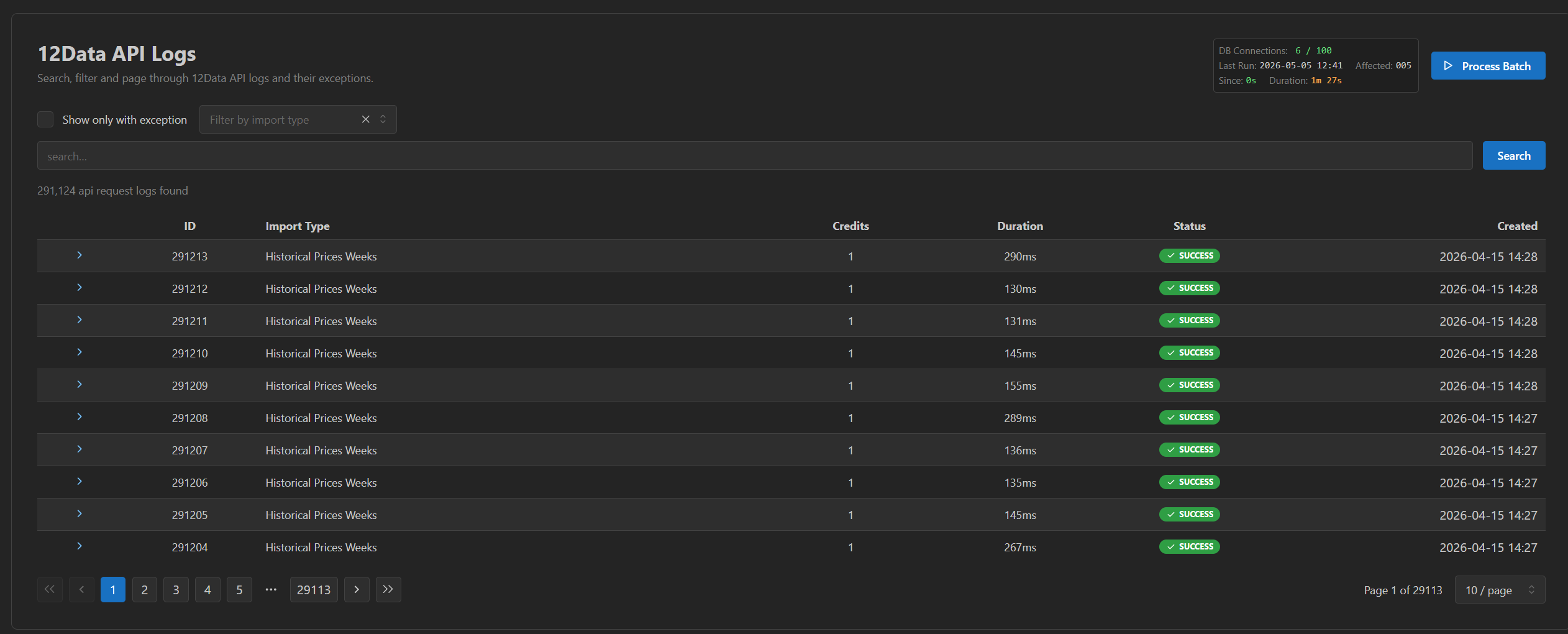
- API call log with type, credits, and outcome per call.
- Credit usage aggregated over recent windows, including per-minute usage where the plan limit makes that meaningful.
- Exceptions and failures attached to the specific call that produced them — failed symbols, failed endpoints, unexpected responses, missing data.
- Heartbeat / status — a simple answer to "is the pipeline running?" without reading code.
This is operational admin, not customer-facing product UI. It is built so the operator can answer "is something wrong, and if so what" without calling the developer. Building customer-facing product screens on top of this data is not part of the default scope.
Inside the admin: a walkthrough
Screenshots from the CompanyGraph admin running this exact pipeline. Same operational shape ships with your integration, adapted to your stocks, data, and deployment boundary.
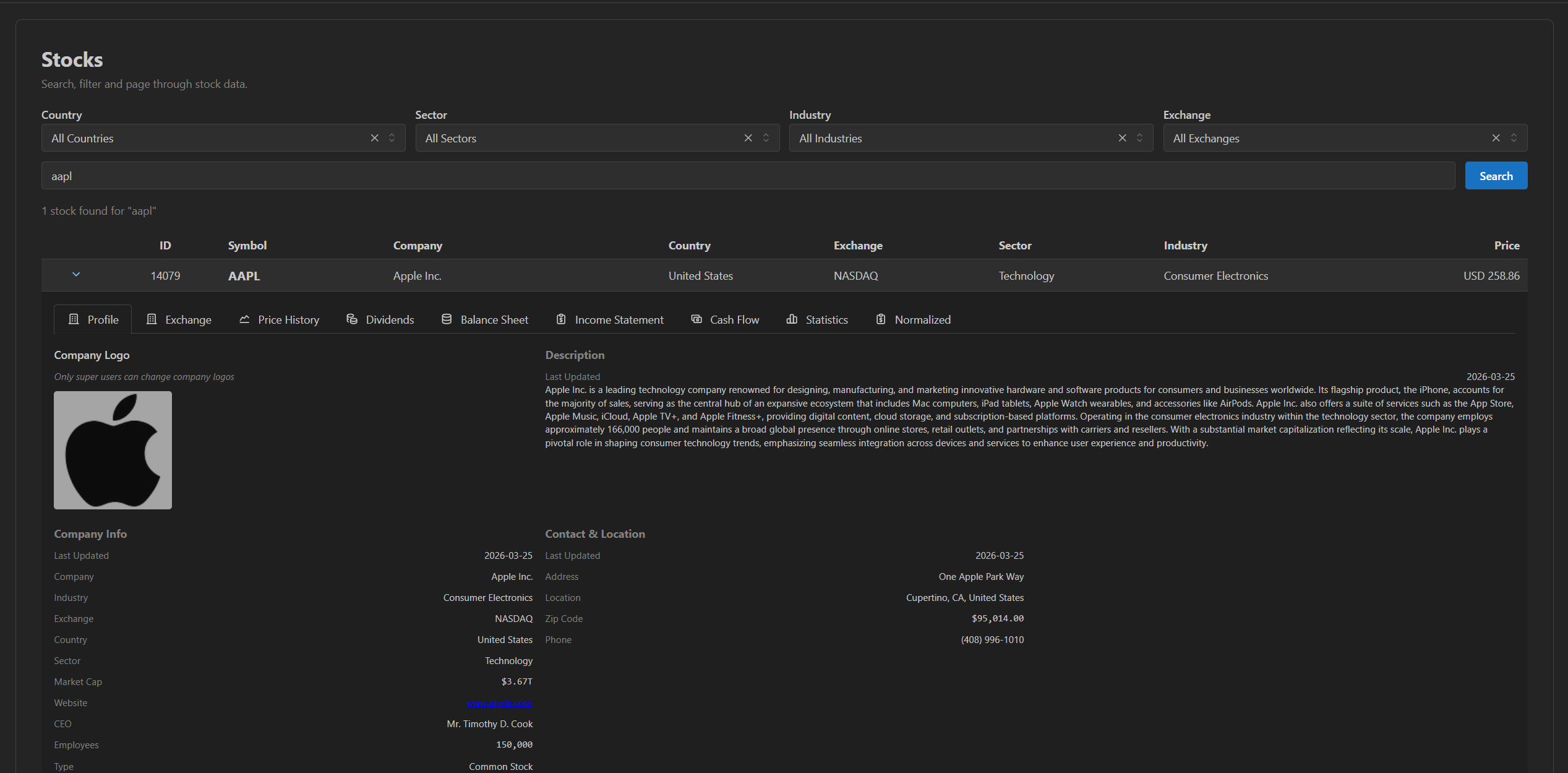
The imported universe
Search and filter across every stock the pipeline holds. Country, sector, industry, exchange, free-text — all on the locally stored data, no provider call.
Per-stock provider data
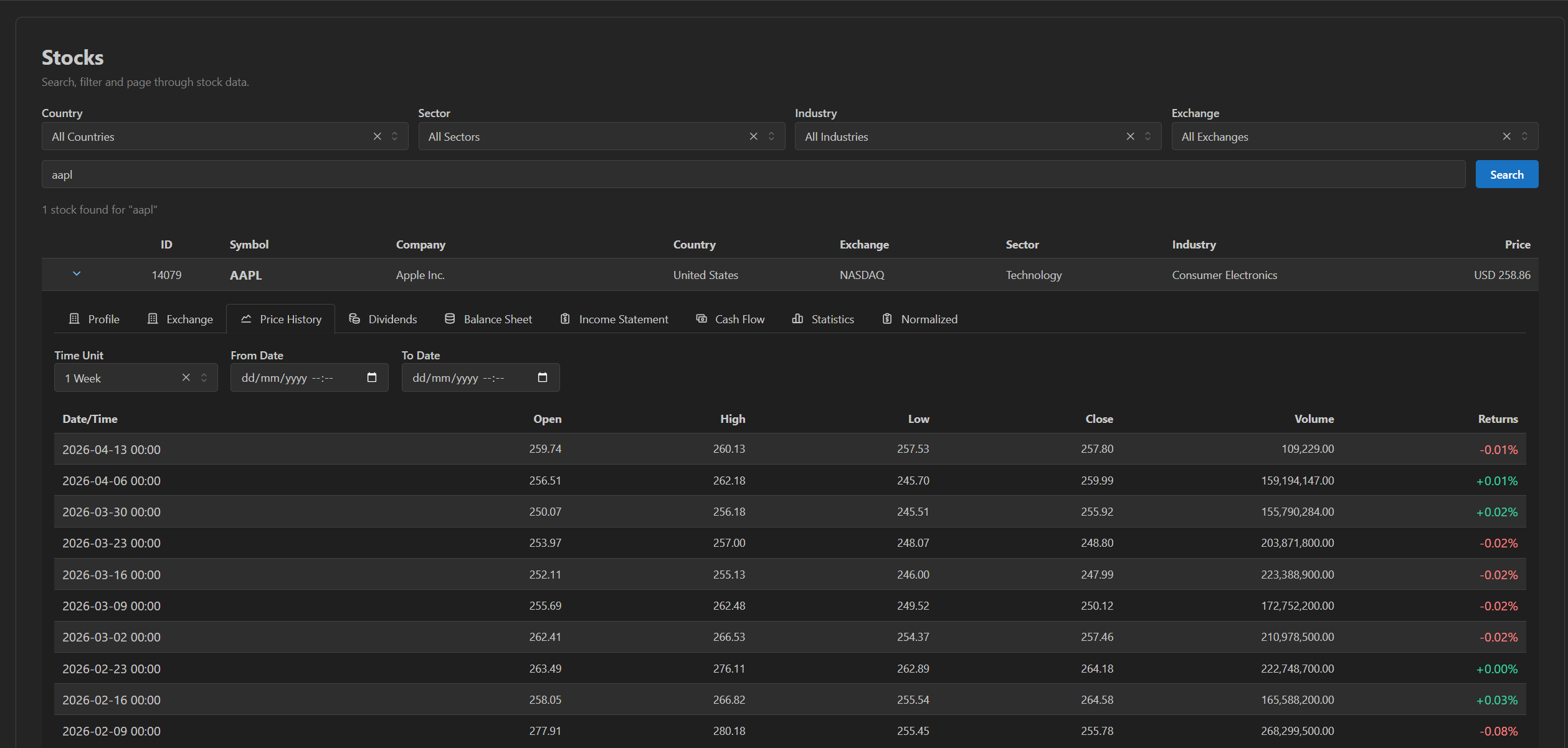
Open any stock and the admin lays out the raw TwelveData object model — Profile, Exchange, Price History, Dividends, Balance Sheet, Income Statement, Cash Flow, Statistics — each backed by the full stored data.
Price history. Locally stored OHLC at the chosen interval.
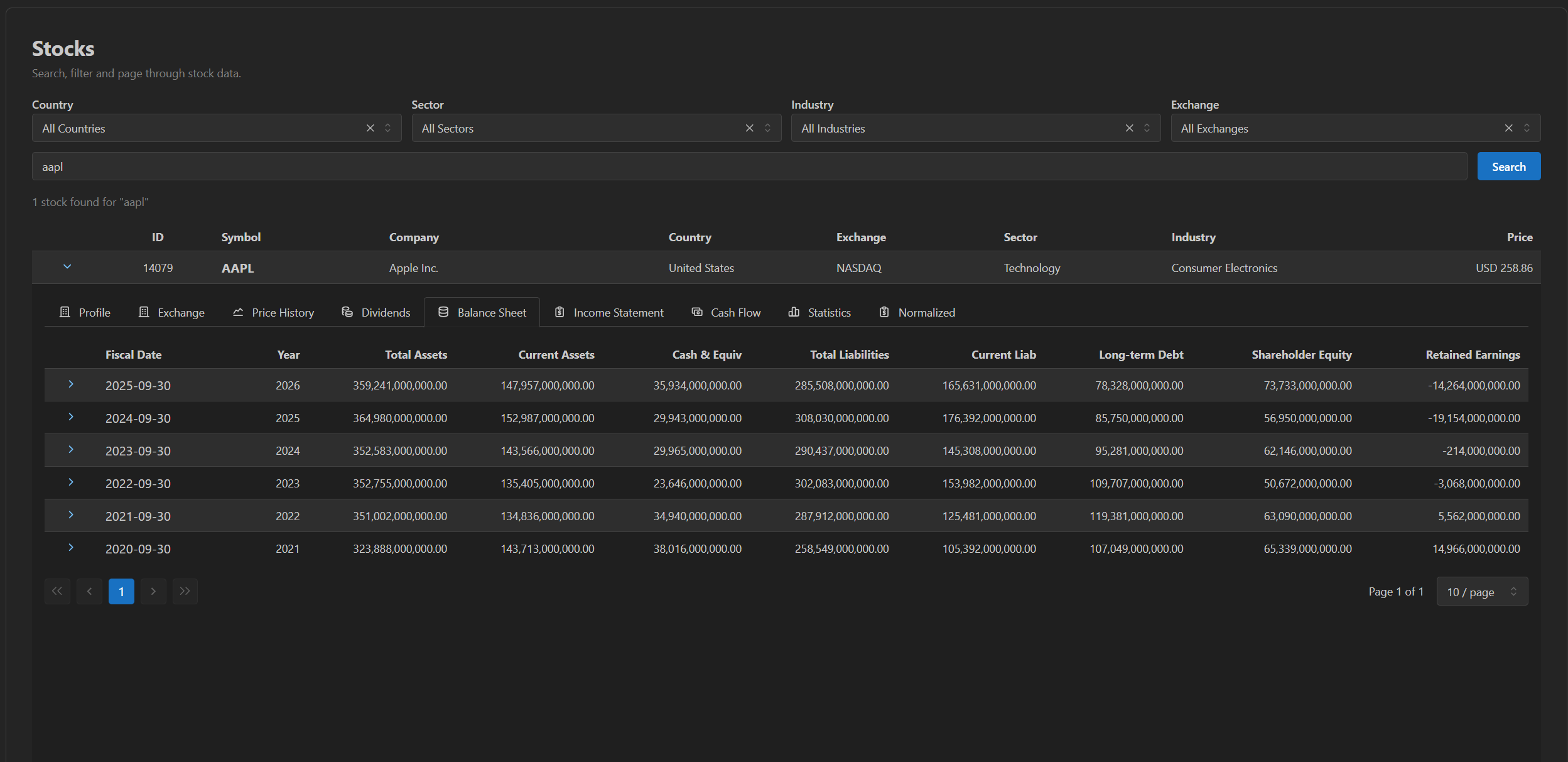
Balance sheet. Every stored period; click any row to inspect every field on that record.
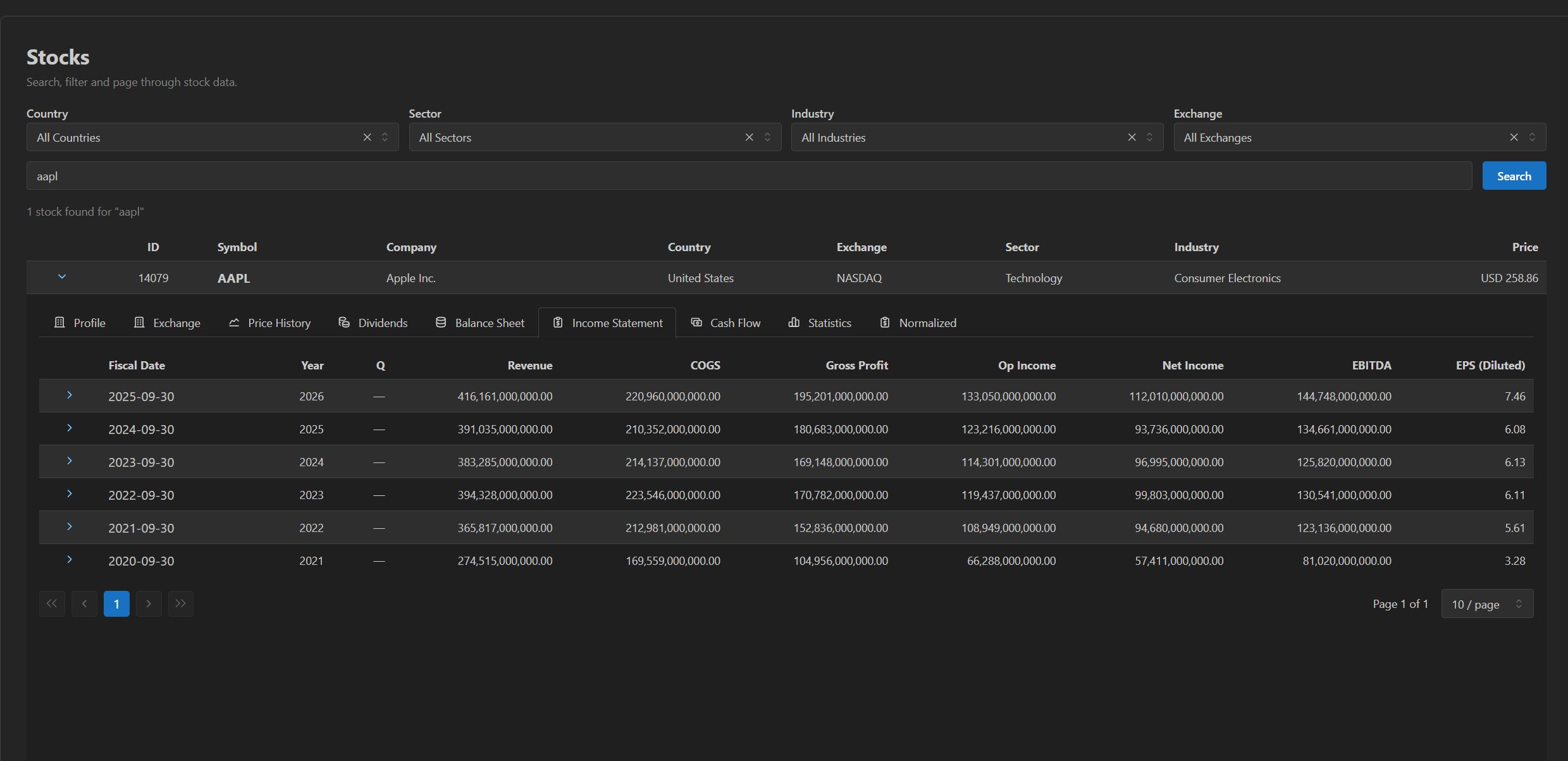
Income statement. Same pattern — annual + quarterly history, inspectable per row.
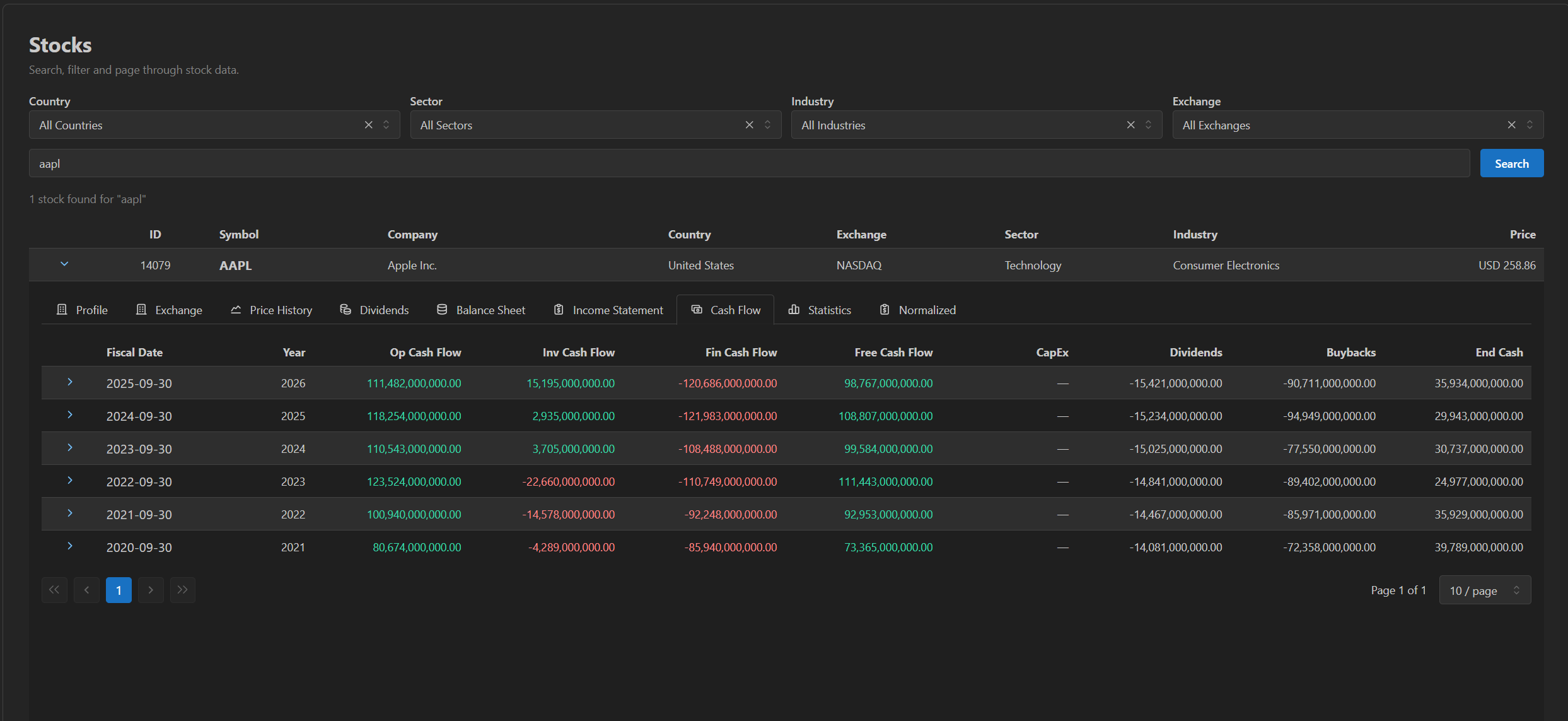
Cash flow. Same pattern.
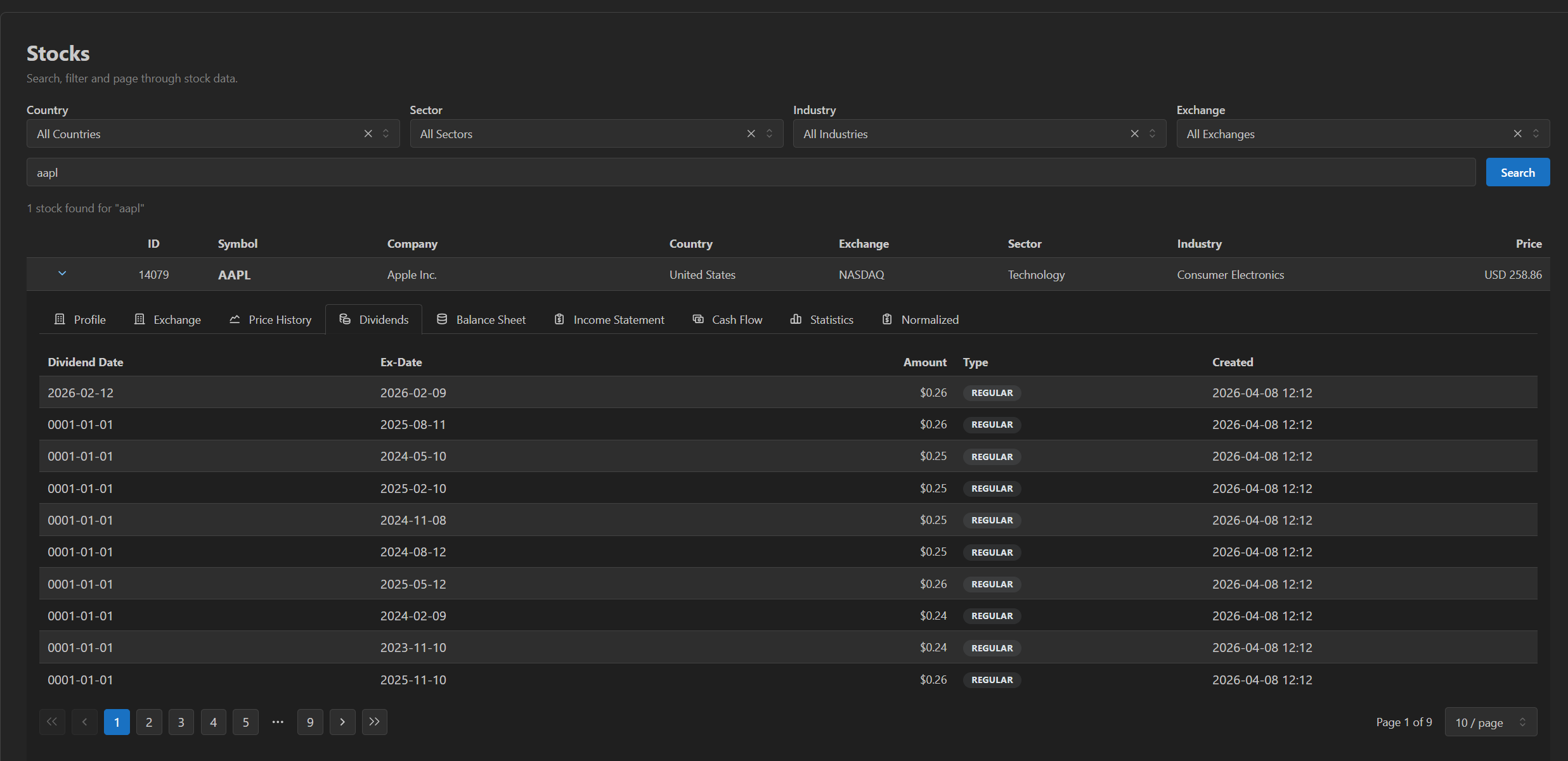
Dividends. All recorded dividend payments for the stock.
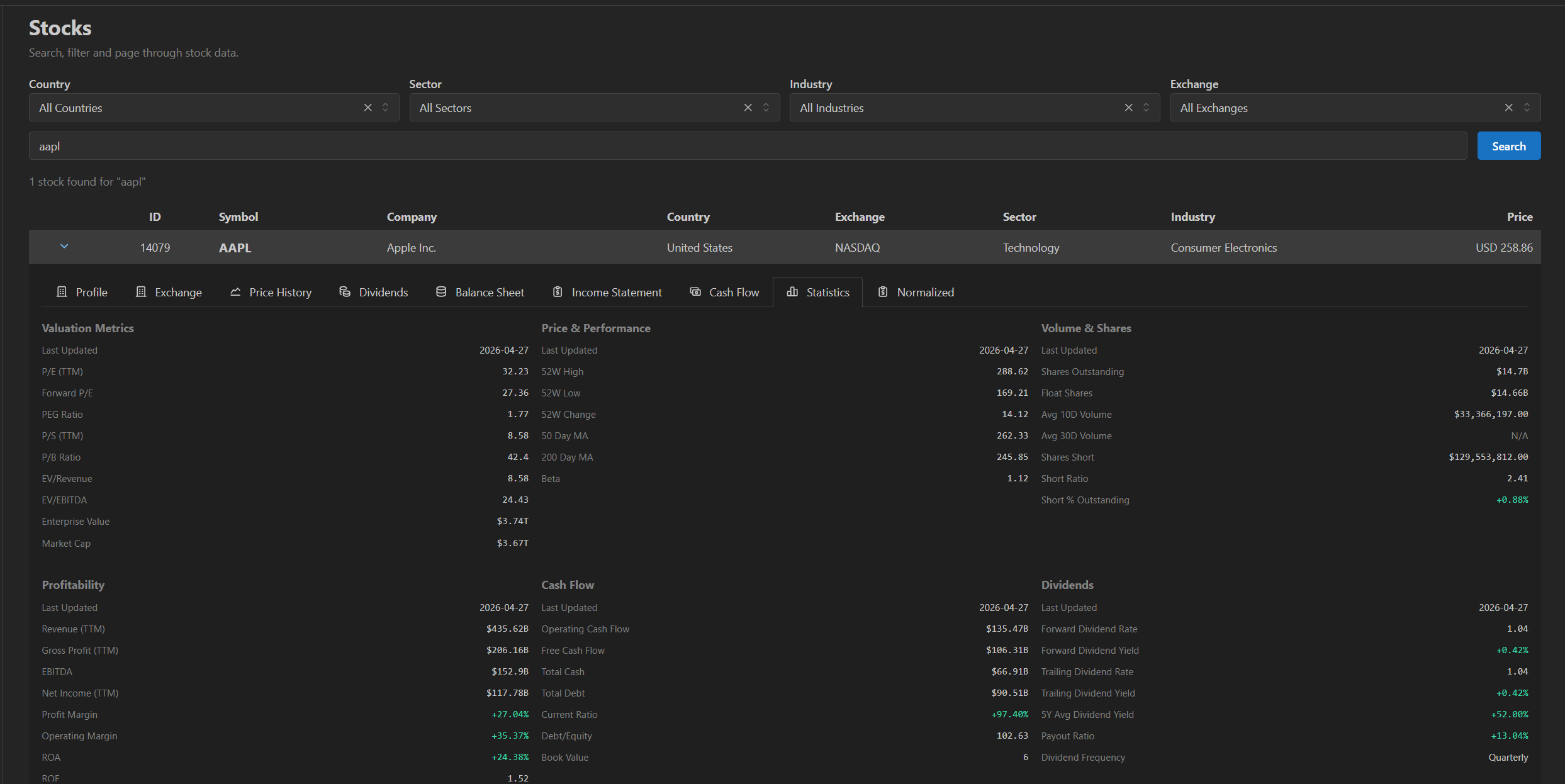
Statistics. Current snapshot of valuation, profitability, and risk metrics from the provider.
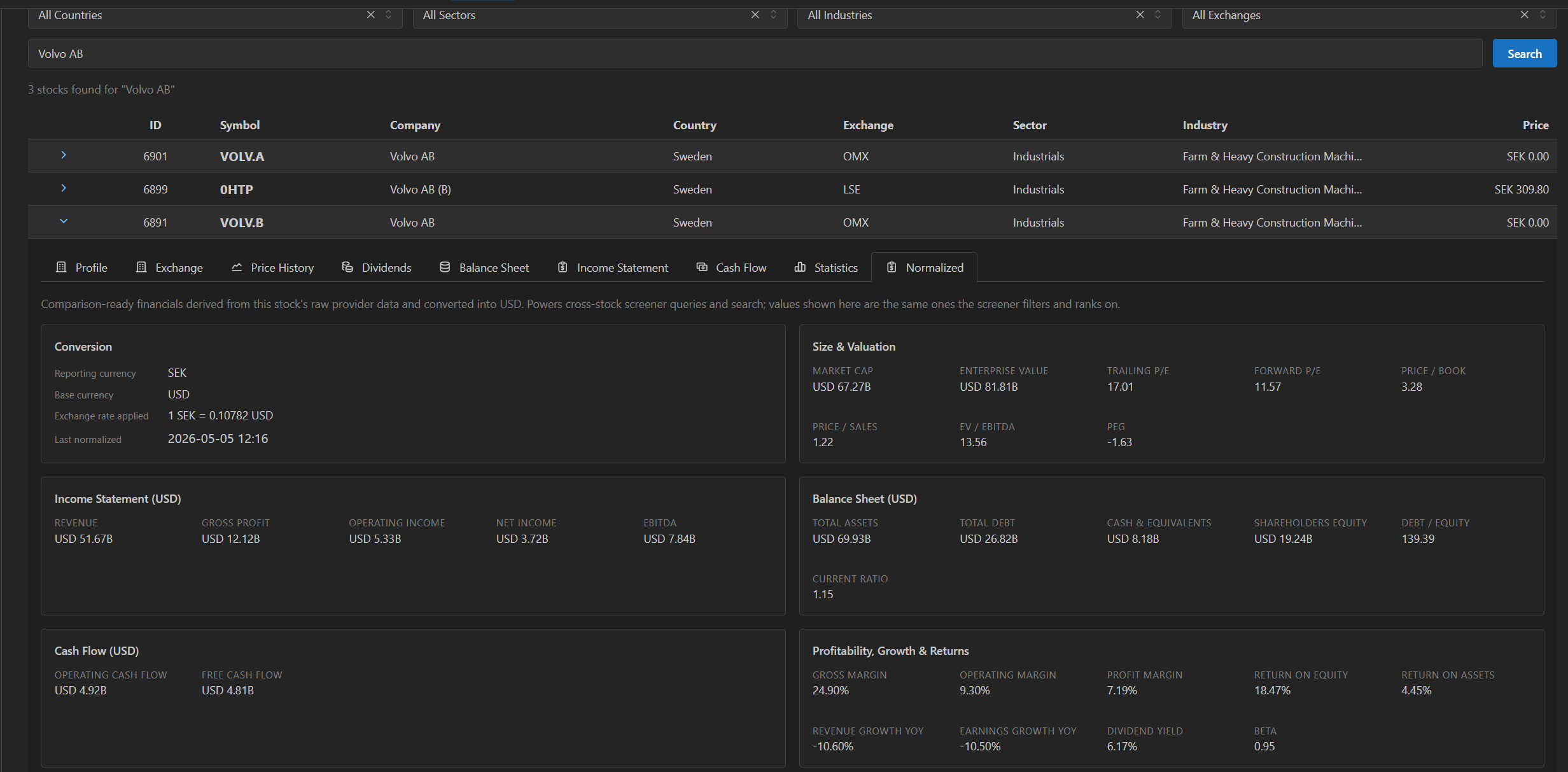
Derived USD layer
Beyond the raw provider objects, the admin exposes the normalized USD-converted layer the screener uses for cross-stock queries — comparable values across countries and reporting currencies, with the exchange rate applied recorded against each snapshot.
Operational visibility
Every TwelveData call recorded — type, credits, outcome, exception detail when it failed.
Credit usage aggregated to the minute, hour, day, week, or month — so the credit budget against the plan ceiling is something the operator can see, not infer.
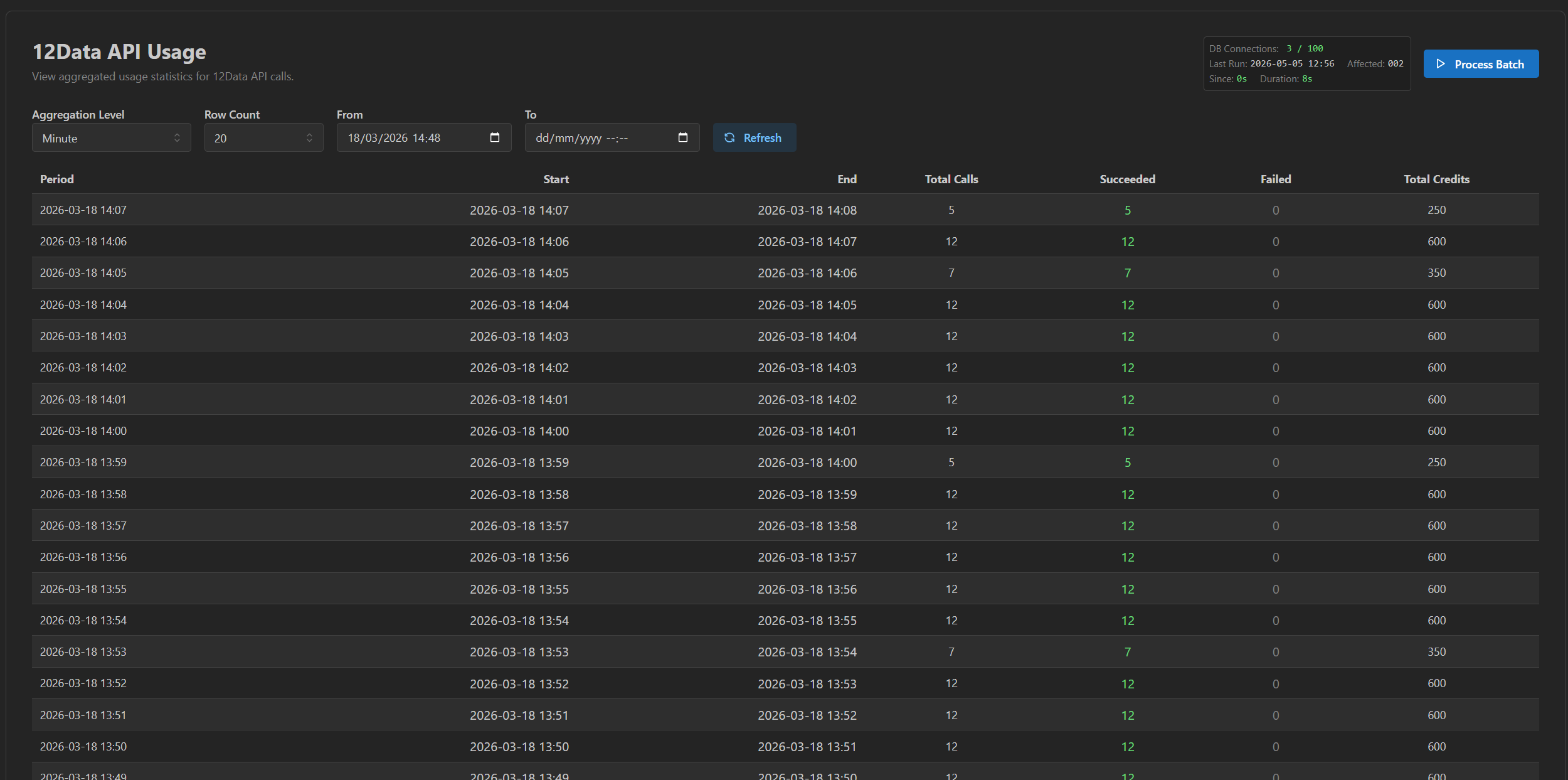
REST API and integration boundary
The client's application consumes the data through a stable REST boundary. The endpoints, payload shapes, and authentication mechanism are defined during scoping and documented as part of delivery.
If the client already has an internal stock or company model, the mapping between their internal identity and the TwelveData instrument identity is part of scoping. The default approach is an explicit mapping table maintained by the integration; the alternative is a direct identity model owned by the client. Either is fine; both need to be a deliberate choice rather than an emergent one.
Pricing
The same module, two surrounding systems — and the price follows the surrounding system, not the module.
On Prototype to Product, the deployment, logging, admin, batch lifecycle, and API shape already exist. The pipeline plugs into known structure, so the price is lower and fixed up front.
Standalone, the pipeline lands inside a system Smallbox did not build. That system has to be understood first — and depending on how large that task is, there can be extra cost. Standalone integrations are therefore scoped separately: the fixed price is named in writing before implementation starts.
| Mode | Price | Payment | Duration |
|---|---|---|---|
| Module on Prototype to Product | from €5,000 | Half at the start, half on delivery | ~4–6 weeks of focused engineering |
| Standalone integration into an existing system | Scoped separately | Fixed price agreed in writing before implementation starts | Depends on the surrounding system |
Scoping is the first step of the work, and it costs nothing. Before implementation starts, we define together:
- Where the integration lives (Option A / B / C above).
- Which data types are included.
- Which instruments are in the universe.
- Which data is stored locally, which is refreshed on schedule, which is on-demand.
- The freshness policy per data type — refresh cadences for prices, statements, profile, statistics, dividends; what counts as acceptably stale; what the admin shows when data is old, missing, failed, or unavailable.
- For daily price history: how much depth to keep (one month, one year, ten years).
- Whether a smaller priority universe gets more aggressive refreshes.
- The TwelveData plan and credit boundary the pipeline is designed around (610 API credits/minute by default — Pro on the Individual track, Venture on the Business track when commercial display rights are needed). The client confirms the right plan for their usage.
- Reserve capacity kept for on-demand refresh so scheduled batches don't crowd out user-triggered freshness.
- How the client's application consumes the data.
- Whether mapping to existing internal records is needed, and how it is structured.
- Which admin/status surfaces are needed.
- Hosting and deployment placement.
- What is included in the fixed implementation.
- What is explicitly outside scope.
Those decisions are agreed in writing, together with the fixed price, before implementation begins. Defining them costs nothing.
Larger or custom work — extensive custom mapping into a complex legacy system, customer-facing frontend screens, migration of historical data, many additional data types beyond the standard set, richer admin tooling, production monitoring beyond the default, or extended support — is quoted separately on top of the standard package.
Hosting
Hosting costs are not included in the package.
If the integration is deployed inside the client's existing infrastructure, it runs there. If it is deployed as a separate service, the client owns the hosting account (Hetzner, AWS, or similar). Smallbox can set up the server, nginx, systemd, deployment, database, and backups as part of the implementation if agreed during scoping — but the account and the recurring cost belong to the client.
This is intentional. It keeps the operational ownership where it belongs and avoids creating a permanent dependency on Smallbox to keep the system online.
Vendor-change boundary
The integration is built against TwelveData's API behaviour, plan limits, response formats, data coverage, and pricing as they exist at the time of implementation.
If TwelveData later changes endpoints, field meanings, response shapes, plan structure, credit costs, symbol coverage, or pricing, adapting the integration is separate follow-up work. The pipeline will continue to record failures, stale data, credits, and update status correctly — but the cost of keeping the integration aligned with vendor-side changes is not included in the original delivery.
This is named here so it does not become an awkward conversation later.
What is not included by default
- Hosting account or recurring infrastructure cost.
- Customer-facing frontend product screens. The package builds operational admin, not the client's product UI.
- Vendor-side changes after delivery (see boundary above).
- Migration of historical data from a previous provider.
- Deep custom mapping into a complex legacy stock/company model beyond what is agreed during scoping.
- Many extra data types beyond the standard set agreed at scoping.
- Production monitoring, alerting, or on-call beyond the default heartbeat/status surface.
- Ongoing support or retainer.
Each of these is real and reasonable work — but it is not what the package price buys. If any of them is required, it is named during scoping and quoted separately.
Proof — already running in production
Smallbox built and operates a production TwelveData-powered pipeline inside CompanyGraph: import universe, batch lifecycle, credit accounting, failure visibility, local persistence, REST API access, and admin/status visibility — all live, all visible, all operational.
This package takes that same architecture and applies it to your system.
When the System Report is the right path instead
Starting directly with this package is right when the surrounding system is reasonably understood and the question is "how do we add a TwelveData pipeline to it."
If the surrounding system is much larger, fragile, unclear, or already carrying significant hidden business logic, the right first step may not be this package — it may be a System Report on the surrounding system, where the TwelveData pipeline becomes one recommendation among several. That conversation is short and happens up front.
For most cases where the team already knows they want a TwelveData integration and just needs it built properly, starting directly is correct.
How to start
The first step is a scoping conversation — free, no commitment. It produces the document the implementation runs against — universe, data types, schedules, storage placement, deployment shape, admin surface, REST contract, mapping approach, and the boundary of what the standard package covers for your system specifically. The scope and the fixed price are agreed in writing before implementation begins.
If the pipeline is landing in a system Smallbox did not build, understanding that system comes first — depending on its size, that work is priced into the quote, and it is named there, not discovered later.
The first step before this package is a short scoping conversation — free, no commitment. The full System Report is the right first step only if the surrounding system is much larger, fragile, or unclear.